Administrative Settings
In this page, you can set QIoT device gateway settings: QIoT server network configuration and myQNAPcloud service settings
QIoT device gateway settings
For device gateway settings, you can select to enable or disable mandatory use of SSL protocol, if you choose to enable, Things will only be able to use MQTTS and HTTPS for QIoT connection.
QIoT server network configuration
Server network configuration lists all QNAP NAS network Interface IPs of QIot Suite Lite. QIoT server uses all available IP addresses to generate device credentials for MQTTS, and also uses these IP addresses as host addresses in the connection file (resourceinfo.json). (If QNAP NAS changes IP, you must update to the new IP for QIoT connection)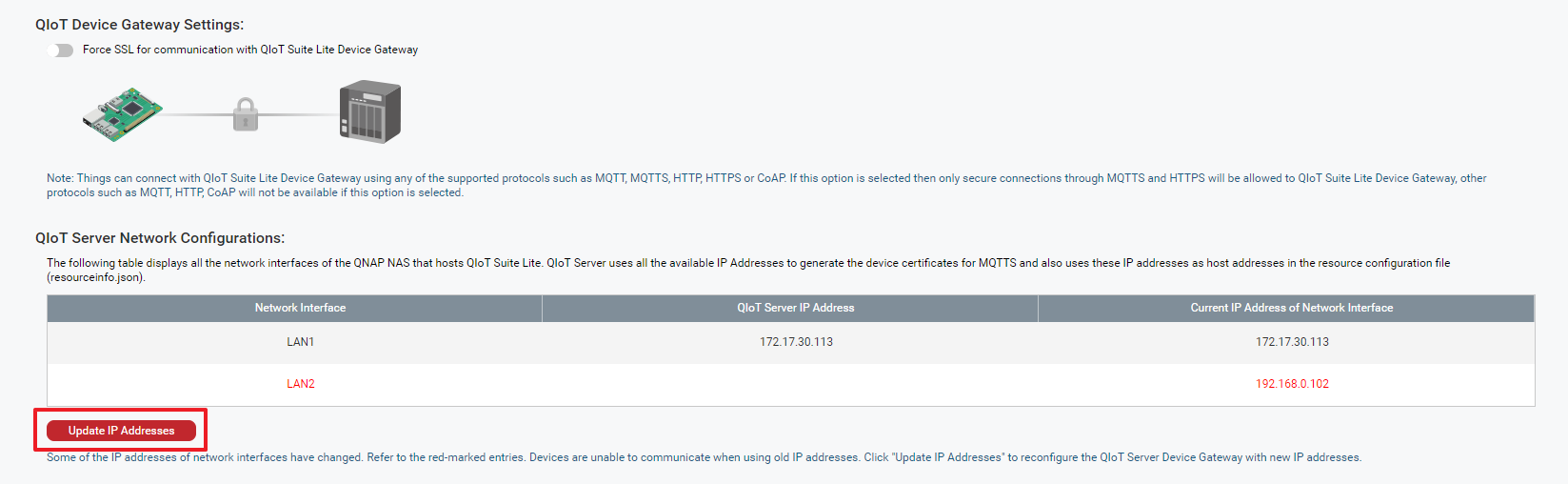
myQNAPcloud service settings
You can use myQNAPcloud DDNS address to connect your device to the NAS-managed QIoT Suite Lite.
You can use the Internet addresses generated by myQNAPcloud with supported protocols (such as MQTT, HTTP, HTTPS, CoAP). However, if you want to use MQTTS, the Internet addresses must be updated by QIoT Suite Lite server using the device gateway to produce device credentials for the object (prerequisites for using MQTTS).
Back up QIoT Suite Lite:
QIoT Suite Backup creates a backup copy of your entire QIoT Suite Lite system, including IoT Applications, device information and all stored sensor data. Your entire QIoT system can be restored by using the QIoT Suite Restore function.
Restore QIoT Suite Lite:
Restore your entire system from a QIoT Suite Backup. Please note that you can only restore QIoT Suite Lite to the same NAS.